Is your parts data ready for a parts portal? A readiness check
Most parts portal projects stall on data, not on software. What a portal needs from your part master and BOMs, how to score readiness, and what to fix before go-live.
Not ready to talk yet? Take the 3-minute Data Foundation Check
TL;DR
- A portal shows your data to customers. Every gap your parts desk quietly fixes on the phone becomes visible.
- Five things decide success: lookup by machine, images, attributes, correct prices and stock, current supersessions.
- Score readiness per machine type and launch with the types that pass, not with everything.
- Plan data maintenance from day one, or the portal degrades within a year.
What does a portal need from your data?
| Capability | Data behind it | Common gap |
|---|---|---|
| “My machines” view | Installed base per customer and serial | Machines linked to dealers, not end customers |
| Exploded views with hotspots | Service BOM positions linked to drawings | Positions missing or outdated |
| Search and filters | Classified parts with attributes | Free-text descriptions only |
| Right part for this serial | As-built or serial effectivity | Only generic BOMs |
| Price and availability | Customer prices, stock, lead times | Prices kept in quotes, not in ERP |
| Current part | Supersession chains | Replacements only mentioned in text |
How do you score readiness?
Readiness per machine type (0–100) =
  20 × installed base linked to end customers
+ 20 × service BOM with positions for ≥ 90% of service parts
+ 20 × top 200 parts with image and key attributes
+ 15 × clean supersession chains
+ 15 × customer prices available in ERP
+ 10 × stock and lead time per part

Launch with machine types scoring ≥ 70
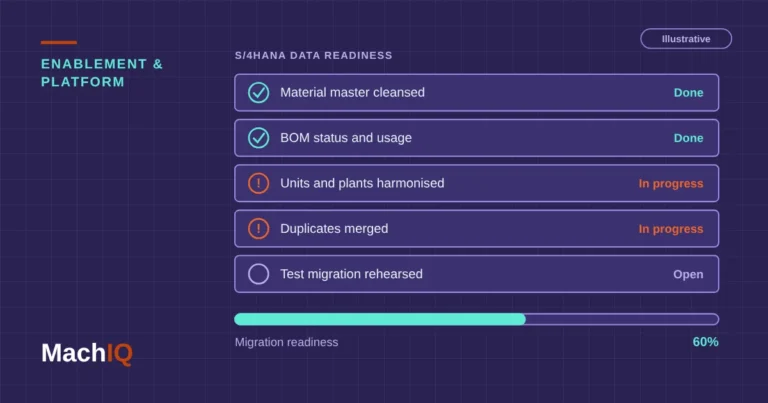
In which order do you fix it?
Launch small, then widen
A portal that works perfectly for your three newest machine types beats one that covers everything and ships wrong parts. Customers forgive a missing machine more easily than a wrong delivery.
What has to happen after go-live?
- Every newly shipped machine is added to the customer’s portal account automatically.
- Every engineering change that touches service parts updates the service BOM and supersessions.
- Search logs are reviewed monthly. Zero-result searches show missing data.
- Prices and stock sync from ERP at least daily.
Checklist
- Installed base linked to end customers
- Service BOMs with positions for wave-1 machine types
- Images and attributes for the top 200 parts
- Clean supersession chains
- Customer-specific prices maintained in ERP
FAQ
What data does a spare parts portal need?
Installed base per customer, service BOMs with exploded-view positions, classified parts with images and attributes, supersession information, and customer-specific prices, stock and lead times.
Why do parts portal projects fail?
Most often because the data isn’t ready: machines aren’t linked to end customers, service BOMs lack positions, parts lack images and attributes, and prices are kept outside ERP.
Should we launch the portal for all machines at once?
No. Launch with the machine types whose data is ready, usually the newest ones, and add older types as their data is cleaned.
How do we keep portal data current?
Link it to the processes that change the data: new machine shipments, engineering changes, price updates. Review zero-result searches every month.
Do we need serial-specific BOMs for a portal?
They help a lot, because customers see exactly the parts in their machine. Where as-built data is missing, serial effectivity on the service BOM is a workable start.
Is your data ready for a parts portal?
Send us installed base, service BOM and part data for two machine types under NDA. We’ll return a readiness score and the gaps to close.