Building a retrofit and modernisation pipeline from your installed base
Every OEM has hundreds of machines running on controls or drives that are no longer supported. A scoring model that turns that installed base into a ranked list sales can call this quarter.
Not ready to talk yet? Take the 3-minute Aftermarket Revenue Check
TL;DR
- Retrofit demand is driven by obsolescence: controls, drives and safety systems that are discontinued or hard to repair.
- Score machines by technical need, customer value, relationship and timing, not by age alone.
- The strongest signal is rising repair activity on a discontinued component.
- Package retrofits as standard kits per machine generation, so quoting takes days, not weeks.
What makes a machine a retrofit candidate?
| Signal | Example | Source |
|---|---|---|
| Discontinued control or drive | Control generation no longer supplied | Machine type, as-built, supplier notices |
| Rising repair frequency | Third drive repair in 18 months | Service orders |
| Spare part scarcity | Repair-only parts, long lead times | Parts orders, supplier data |
| Safety gap | Safety concept no longer state of the art | Machine age and type |
| Productivity gap | Older machines slower than current models | Product management |
| Customer activity | Customer expanding or investing | CRM, sales |
Watch the component, not the machine
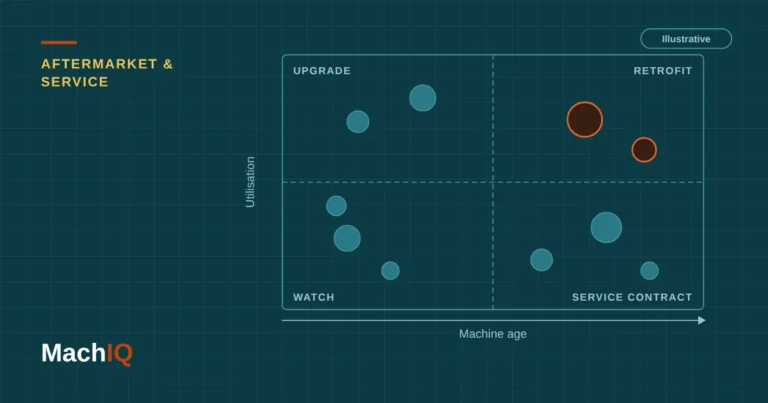
A 20-year-old frame is rarely the problem. The trigger is usually a control, drive or HMI that can no longer be repaired at a reasonable cost.
How do you score candidates?
Retrofit score (0–100) =
  35 × technical need    (discontinued components, repair trend)
+ 25 × customer value    (machines at site, parts revenue, strategic account)
+ 20 × relationship      (contract, recent contact, wallet share)
+ 20 × timing            (budget cycle, age band, last overhaul)

Top 50 by score  →  sales pipeline this quarter
From list to pipeline
- Map obsolescence status per component, machine type and generation.
- Join with service history to see repair trends.
- Score every active machine and roll up to site and customer.
- Build standard retrofit packages per generation with fixed scope and price ranges.
- Load the top candidates into CRM, with the reason and the suggested package.
What makes retrofit sales work?
- Lead with risk: “your drive is discontinued, the next failure may take weeks to fix”.
- Bring numbers: repair cost and downtime of the last 24 months for that machine.
- Offer staged options: minimum safety and control upgrade, full modernisation, or trade-in.
- Plan capacity: retrofits compete with new machine projects for the same engineers.
Checklist
- Control and drive generation known per serial number
- Obsolescence status per component from suppliers
- Service history with repairs per machine
- Standard retrofit packages per generation
- Candidates and reasons visible in CRM
FAQ
What is a machine retrofit?
Upgrading an installed machine with new components, typically control, drives, safety systems or software, to extend its life and bring performance or safety up to date without replacing the whole machine.
How do OEMs find retrofit candidates?
By combining the installed base with component obsolescence data and service history. Machines with discontinued controls and rising repair activity are the strongest candidates.
Why is obsolescence the main retrofit driver?
When a control or drive is no longer supported, every failure risks long downtime. That makes the business case concrete for the customer.
Should retrofits be standardised?
Where possible, yes. Standard packages per machine generation shorten quoting, reduce engineering effort and keep pricing consistent.
How often should the retrofit pipeline be refreshed?
Quarterly, and whenever a supplier announces a discontinuation that affects your installed base.
How many of your machines run on discontinued components?
Send us installed base and service data under NDA. We’ll return a scored list of retrofit candidates.